
+- Comfort Automation/ Security System Forums (https://www.comfortforums.com)
+-- Forum: Support (https://www.comfortforums.com/forum-2.html)
+--- Forum: Problems & Troubleshooting (https://www.comfortforums.com/forum-36.html)
+--- Thread: How to turn off technical issues being reported on the keypad? (/thread-3154.html)
- agenor - 11-09-2012
Sometimes it happens that one of the SEM modules looses power (both battery and main) due to some problems with wiring (which we\'re working on).
In such case, the keypad starts emitting very, very loud beeps, announcing this error.
The user, naturally, doesn\'t want to be disturbed about such technical issues (it is sufficient that a maintenance guy receives the alarm on his mobile number).
What do we need to do to turn of such annoying alarm reporting on the keypad (so that it only gets reported by phone)?
- ident - 11-09-2012
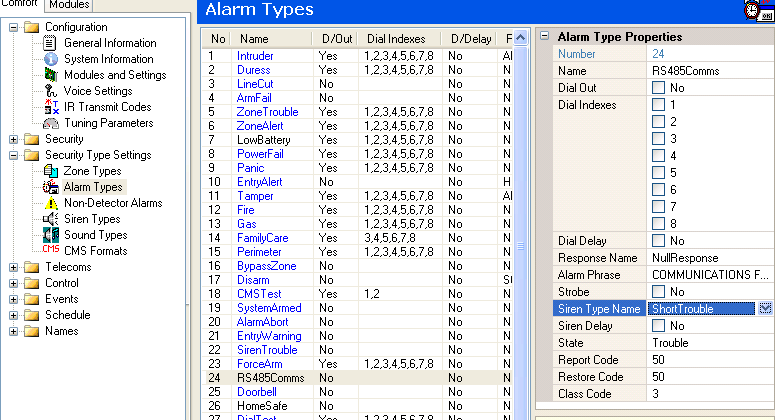
The RS485 Communications Alarm is an Alarm Type which you can find in Security Types Settings > Alarm Types in the screenshot below
Select the RS485 Ccommunications Alarm, and in the Right Pane change the Siren Type Name from \"Short Trouble\" to \"Unassigned\"
This will cause No siren sound to be produced when a RS485 Communications failure is detected
- agenor - 11-09-2012
Thanks. But, did you notice, the alarm doesn\'t sound on the siren. It sounds on the KEYPAD! The siren exists in the system, it is connected, but it doesn\'t sound.
- ident - 11-09-2012
The alarm does not always sound on the siren
You do not want a Trouble alarm to sound on the siren, correct?
Whether the siren sounds or not depends on the Siren Type settings
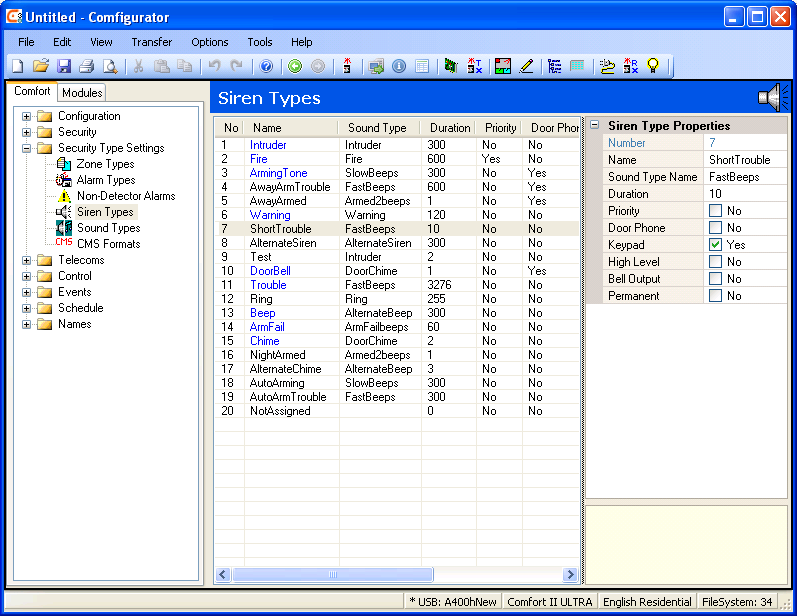
The Bell Output setting for each Siren Type determines if the siren Type is heard on the Siren or bellbox
- agenor - 11-09-2012
I see. Yes, you are right. Thanks!