05-28-2012, 12:30 PM
Comfigurator 3.5.0 (now in beta) has introduced many major new changes and improvements. This is a series of tutorials on the new changes
Number Of UCMs, Keypads, Slaves, Door stations, RIOs in Modules and Settings are Read Only
This change was actually introduced in 3.4.0 but it may confuse those who have just upgraded from an older version
You cannot directly change the Numbers of UCMs etc in Modules and Settings anymore - they are now Read Only and shown in blue
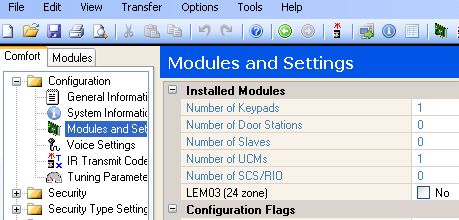
To change the numbers of each module, go to the Modules Tab
Right click and select Scan for All Modules, or Scan for UCMs, Keypads etc in each category
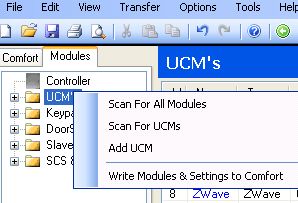
You can also select Add Module, or Delete the module
These changes will automatically update the Number of each module in Modules and Settings
Number Of UCMs, Keypads, Slaves, Door stations, RIOs in Modules and Settings are Read Only
This change was actually introduced in 3.4.0 but it may confuse those who have just upgraded from an older version
You cannot directly change the Numbers of UCMs etc in Modules and Settings anymore - they are now Read Only and shown in blue
To change the numbers of each module, go to the Modules Tab
Right click and select Scan for All Modules, or Scan for UCMs, Keypads etc in each category
You can also select Add Module, or Delete the module
These changes will automatically update the Number of each module in Modules and Settings