Hi All - I\'m new to comfort and have a question which i hope someone maybe able to answer.
I have a new Comfort Ultra with UCN06+Ethernet and the UCM Universal card.
What i would like to do is send Comport a TCP message from my network camera to turn a light on when it detects motion.
My interface on comfort is 192.168.0.125 on port 1001.
I cant quite see if its possible to send a string to this port and how Comfort and listen and respond to the message.
Any examples of the format to send would be good...
Thanks
Martin
I\'ve sort of done that, but using the alarm relay on the camera/dvr. Nice thing about it is if you use a dvr, then you can be a lot more specific about where the motion is detected.
Hi, Yes i could but id like to try and use the network if possible
My camera has different motion detection windows so i would like to send TCP commnds.
I have the UCM to ethernet interface, do i need another ethernet interface if i have the Universal UCM?
If so this may be my first problem
The UCM/ETH02 (UCM06+ ETH02) communicates using the Comfort protocol
So you can send messages to Comfort by this UCM if the commands are Comfort commands
If you need to send a message according to any other protocol then you need the UCM/Universal + ETH02
UCM/Universal does not come with any interface. When you buy you can add RS232, RS485 or ETH02, so if you have the ETH02 on top of the UCM/Universal then you can send message to that
Hi Ident
Thanks i now have the Universal UCM with an Eth02 piggy back.
I have configured it to an IP and port 192.168.0.126 : 1020.
Can you give me a little guidance to see if my network camera can talk to confort.
It is a Mobotix M12 camera cable of sending IP notifications via raw TCP/IP plain text.
Do you think Comfort would be able to learn a string sent to it?
Can you give me an example of what format i should send this in please?
I\'ve had a go but dont seem to able to see anything if i click monitor - do i somehow need to make my camera login?
Could i include the login in the text i send to comfort?
Thanks in advance
Martin
In server mode, the ETH02 is able to receive messages sent to its IP address/Port. This means your camera must send its notifications to the ETH02 IP addresses
In Client Mode, the ETH02 sends and accepts messages from a server at another IP address. You have to enter the server IP address/port at this mode
So it depends on how the camera works, please check the instructions of the camera
Ident
Sorry slight hijack to this thread, but I too am interested in getting Comfort to communicate with other devices on my network.
I have a couple of questions: how do I identify if I have EHT01 or ETH02 installed? Is this possible to tell through Comfigurator? It says UCM type 10 with Firmware 7.008 under System Information.
Is there any guidance on how to set up as client to get comfort to send and receive messages to / from an IP address?
Thanks
Henley
ETH01 and ETH02 are the submodules that are plugged onto the base UCM06
UCM/ETH02 looks like below

see
http://www.comfortforums.com/forum113/2602.html on the forum
ETH01 has an orange module as shown below

To set the Routing Mode, open DS Manager in Options > Settings UCM Comunications after selecting Network
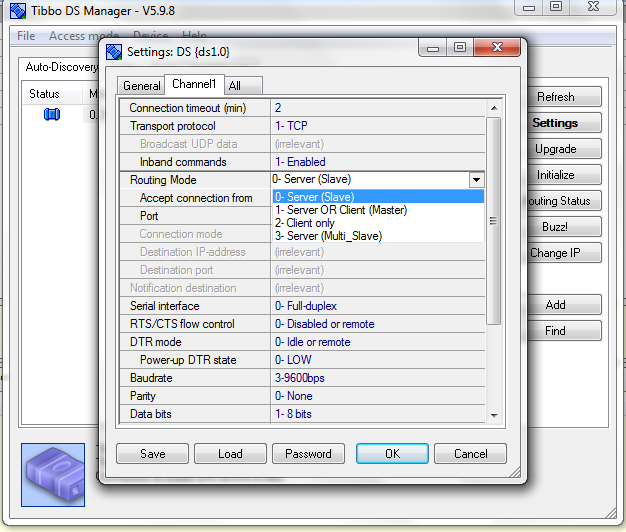
The routing mode is Server (slave) for normal operations where any client needs to communicate with the UCM by addressing the message to the UCM IP address/port
This is the mode used in normal UCM/ETH02 where the PC is the client and UCM/Eth02 is a server
Client Mode is where the UCM only talks with another device (server) by their IP address/port. In case of Client Mode, a Destination IP address and Port is specified. This is often used when communicating with other devices

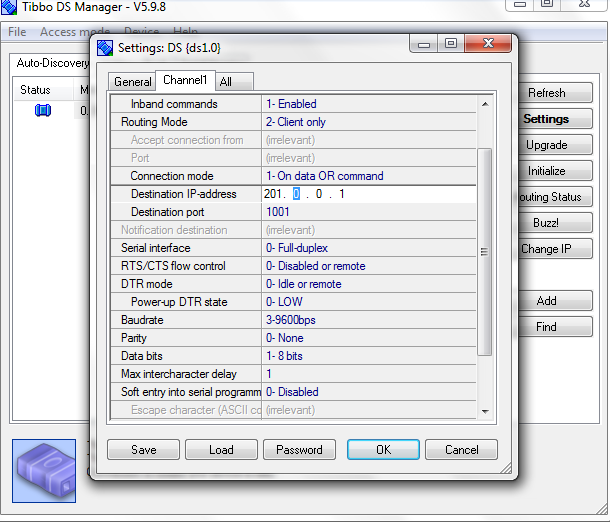
For example if the UCM/Universal were to communicate with another Comfort\'s UCM/ETH02, the Universal\'s DS Manager settings would be as Client and the other systems IP/address and port
Ok thanks I\'ll give that a whirl and try again.
The Axis P8221 is my other option, I can send it a http cgi command to set outputs which I could connect to comforts inputs to trigger a response.
I\'m hoping that comfort can do similar without the need for the Axis box.
Cheers
Hi Ident
I tried a few different settings and the camera is definately sending a message to the correct port on on the universal ucm, the camera tells me the messsage was successfully sent and if i change the port the number to something randam the message fails, so somethings getting through somewhere.however I\'m not seeing anything in the ucm monitor or if I click learn.
Comfiguratornucm is 192.168.0.125:1001
Universal ucm is on 192.168.0.126:1020
The camera is just sending a message \'motion\' but I tried other things like decimal and nothing appears in the monitor. I\'m assuming that the monitor will display mall received messages ? Do I need to send like LI1234 to get things accepted first?
Sorry for all the questions I\'m just hoping comfort will operate in this way.
As I said before I can use an Axis communication P8221 which will accept a http request from the camera and set one of its ports high to trigger a response in comfort but I really wanted a direct comfort solution.
Cheers