12-06-2014, 02:07 PM
12-06-2014, 11:57 PM
Right,
Did a bit of work on it today, upgraded my velbus ucm to latest firmware. Everything was working fine again until again, about 5 o\'clock things started to go awry.
Communications failure again. When it started again, It was again only when the velbus heating relay was activated, and I could clear it by un activating it. Measured the voltage for comfort 12v, and was getting about 13.8v, with about 0.1v drop when i truned on the velbus relay, and about the same with any other relay too, so nothing jumping out at that.
Things started to get very weird after a bit more testing and measuring, in that the comms filure was permanent, and the keypads un responsive, so i did the follwing
1) Disconnected all scs switches, (by disconnecting the common 12v feed to them) No change.2) Disconnected both keypads (and tried to log in via app), unable to log in via app.3) Disconnected velbus ucm, no change, reconnected and disconnected just the velbus bus, no change, still unable to log in via app.
Reconneced everything, restarted comfort, kepyapds bleep, announce tamper alarm, as expected, start screaming and then lock out, no access to anything.
Stumped now. I am exepcting it to clear again in a few hours.
Regards,Eamon
Did a bit of work on it today, upgraded my velbus ucm to latest firmware. Everything was working fine again until again, about 5 o\'clock things started to go awry.
Communications failure again. When it started again, It was again only when the velbus heating relay was activated, and I could clear it by un activating it. Measured the voltage for comfort 12v, and was getting about 13.8v, with about 0.1v drop when i truned on the velbus relay, and about the same with any other relay too, so nothing jumping out at that.
Things started to get very weird after a bit more testing and measuring, in that the comms filure was permanent, and the keypads un responsive, so i did the follwing
1) Disconnected all scs switches, (by disconnecting the common 12v feed to them) No change.2) Disconnected both keypads (and tried to log in via app), unable to log in via app.3) Disconnected velbus ucm, no change, reconnected and disconnected just the velbus bus, no change, still unable to log in via app.
Reconneced everything, restarted comfort, kepyapds bleep, announce tamper alarm, as expected, start screaming and then lock out, no access to anything.
Stumped now. I am exepcting it to clear again in a few hours.
Regards,Eamon
12-07-2014, 07:03 AM
Can you measure if there is a short circuit on the KA/KB wires?
try removing the KA/KB and connect just the ucm by the short 4 way cable to Comfort PCB and log in by UCM?
Its better to solve this while the fault is manifested and before it recovers
try removing the KA/KB and connect just the ucm by the short 4 way cable to Comfort PCB and log in by UCM?
Its better to solve this while the fault is manifested and before it recovers
12-07-2014, 01:34 PM
Hi slychui
Will try that, all is working again now, since 8am everything started working again.
I did notice a tamper alarm slave 12 in the keypad, I have no slave units
Will try that, all is working again now, since 8am everything started working again.
I did notice a tamper alarm slave 12 in the keypad, I have no slave units
12-08-2014, 12:17 AM
Hi Slychiu,
OKay, as expected, around about 6 this evening things started going awry again, so here is what I did
1) Removed KA and KB wiring from the main board so that only ucms were connected to ka kb via the ribbon cables2) Tested to make sure no short on the ka/kb inputs that I had just removed, all okay.
So, at this point, all keypads and scs\'s had no ka/kb connectin to comfort. I then logged in to comfort successfully via the app and did the following tests.
1) Turned on the velbus heating channel....the app failed to report the status, and also failed to respond to any other velbus commands to any other channels.2) Turned off the velbus heating channel....the app immediately began to successfully report back velbus commands from any other channel.
I could repeat the above over and over again with 100% the same results each time.
So, it appears that when this velbus channel is activated, it pulls down the ka/kb bus ?
Just to clarify also, this particular velbus channel is 1 of 4 on that vmb4ry module, and all communicate on the same velbus bus, but only this one causes the problem.
The removal of the ka/kb for all the scs/keypads etc would confirm that the wiring of these are not the problem ?
Regards,
Eamon
Comfort firmare is 100% up to date, including ucms. My setup includes 4 scs switches 1 kp01, 1 kp04, 1 ucm eth01, 1 ucm velbus 7 vmb4ry and 1 vmbdmi
OKay, as expected, around about 6 this evening things started going awry again, so here is what I did
1) Removed KA and KB wiring from the main board so that only ucms were connected to ka kb via the ribbon cables2) Tested to make sure no short on the ka/kb inputs that I had just removed, all okay.
So, at this point, all keypads and scs\'s had no ka/kb connectin to comfort. I then logged in to comfort successfully via the app and did the following tests.
1) Turned on the velbus heating channel....the app failed to report the status, and also failed to respond to any other velbus commands to any other channels.2) Turned off the velbus heating channel....the app immediately began to successfully report back velbus commands from any other channel.
I could repeat the above over and over again with 100% the same results each time.
So, it appears that when this velbus channel is activated, it pulls down the ka/kb bus ?
Just to clarify also, this particular velbus channel is 1 of 4 on that vmb4ry module, and all communicate on the same velbus bus, but only this one causes the problem.
The removal of the ka/kb for all the scs/keypads etc would confirm that the wiring of these are not the problem ?
Regards,
Eamon
Comfort firmare is 100% up to date, including ucms. My setup includes 4 scs switches 1 kp01, 1 kp04, 1 ucm eth01, 1 ucm velbus 7 vmb4ry and 1 vmbdmi
12-08-2014, 09:02 AM
So when the velbus channel 1 of VMB4RY is switched on, it causes rs485 bus to lose communications
But then how are you able to switch off the velbus channel 1?
I suspect there may be a fault with the isolation of the Comfort RS485 bus from Velbus RS485 bus
Can you send a photo of thye UCM/Velbus and the connections to it?
But then how are you able to switch off the velbus channel 1?
I suspect there may be a fault with the isolation of the Comfort RS485 bus from Velbus RS485 bus
Can you send a photo of thye UCM/Velbus and the connections to it?
12-08-2014, 12:32 PM
Hi slychiu,
I turn off the velbus relay manually from the wall switch wired to the pb input.
Will send photo shortly, thanks
I turn off the velbus relay manually from the wall switch wired to the pb input.
Will send photo shortly, thanks
12-08-2014, 01:13 PM
Hi,[size=
][/size]Just to update, the comms failure seemed to have come on permanently just before we headed to bed last night. Couldn\'t activate it control anything. Disconnected the ka and kb and could not connect to comfort via the app.[size=
][/size][size=
][/size]Plugged ka and kb back in and went to bed. At 8am this morning, everything restore and working perfectly.[size=
][/size][size=
][/size]I don\'t understand the regularity of this, it\'s so predictable.
][/size]Just to update, the comms failure seemed to have come on permanently just before we headed to bed last night. Couldn\'t activate it control anything. Disconnected the ka and kb and could not connect to comfort via the app.[size=
][/size][size=
][/size]Plugged ka and kb back in and went to bed. At 8am this morning, everything restore and working perfectly.[size=
][/size][size=
][/size]I don\'t understand the regularity of this, it\'s so predictable.
12-09-2014, 01:13 AM
Update today.
Again, all seemed to be okay during the day, I did a few minor things, I downloaded latest firmware to my local drive and updated all my modules locally just to be force a firmware update. All went okay, and everything seemed to be working, but the evening gremlins were not due to call till another few hours.
Bang on que, at about 5pmish problems started again. Here is what I did to troubleshoot
1) I rewired the comfort velbus (l and h) onto a new direct cable from the velbus ucm to the nearest vmb4ry. No change, comms woud fail when heating was turned on, and clear when it was turned off.
2) When comms is down, I can still see commands goin to the ucmvelbus from the vmb4ry modules when i manually activate the relays.
3) I also rewired so that the only velbus mdule connected was the one vmb4ry with the heatng control relay on it. This meant that the only wiring for L and H was a short 2ft cable between the ucm velbus and the vmb4ry. I was still able to replicate the failure of the comms by turning on an off the heating relay.
4) I started to require the heating relay from chan 1 of the vmb4ry to chan 4, to see if I could move the problem with it.
As I was doing this, I then noticed that i had completely lost comms, and could no longer communicate with comfort via keypads, scs, or app (can ping the ucm eth no problem).
To try and isloate the probelm with the comms failure, I started to disconnect different modules on the ka/kb bus as follows
1) Disconnected ka/kb connection to main board, effectively removing all kepyads and scs units. Unable to log on to ucm eth
2) Disconnected ucmvelbus also, leavin just the mainn bard and ucm eth connected, and still unable to connect via app.
3) Disconnected ucmeth, and reconnectd just main board ka/kb to reconnect all scs and kepyapds, unable to get keypads or scs switches working,
It seems I am now completel locked out of the system, I suspect it will remain so until tomrrow at approx 8am.
Regards,
Eamon
Edit:- When I refer to not being able to connnect via app, the login screen appears in the \"connected\" staate, but when I enter the code, I get a continious \"logging in\" message.
Again, all seemed to be okay during the day, I did a few minor things, I downloaded latest firmware to my local drive and updated all my modules locally just to be force a firmware update. All went okay, and everything seemed to be working, but the evening gremlins were not due to call till another few hours.
Bang on que, at about 5pmish problems started again. Here is what I did to troubleshoot
1) I rewired the comfort velbus (l and h) onto a new direct cable from the velbus ucm to the nearest vmb4ry. No change, comms woud fail when heating was turned on, and clear when it was turned off.
2) When comms is down, I can still see commands goin to the ucmvelbus from the vmb4ry modules when i manually activate the relays.
3) I also rewired so that the only velbus mdule connected was the one vmb4ry with the heatng control relay on it. This meant that the only wiring for L and H was a short 2ft cable between the ucm velbus and the vmb4ry. I was still able to replicate the failure of the comms by turning on an off the heating relay.
4) I started to require the heating relay from chan 1 of the vmb4ry to chan 4, to see if I could move the problem with it.
As I was doing this, I then noticed that i had completely lost comms, and could no longer communicate with comfort via keypads, scs, or app (can ping the ucm eth no problem).
To try and isloate the probelm with the comms failure, I started to disconnect different modules on the ka/kb bus as follows
1) Disconnected ka/kb connection to main board, effectively removing all kepyads and scs units. Unable to log on to ucm eth
2) Disconnected ucmvelbus also, leavin just the mainn bard and ucm eth connected, and still unable to connect via app.
3) Disconnected ucmeth, and reconnectd just main board ka/kb to reconnect all scs and kepyapds, unable to get keypads or scs switches working,
It seems I am now completel locked out of the system, I suspect it will remain so until tomrrow at approx 8am.
Regards,
Eamon
Edit:- When I refer to not being able to connnect via app, the login screen appears in the \"connected\" staate, but when I enter the code, I get a continious \"logging in\" message.
12-09-2014, 12:31 PM
Hi,
Photo is here
What you are looking at is the ucm velbus with the new cable I ran yesterday connected. The new cable is about 3ft long and connects direct to the use board housing my velbus modules.
You can also see the old cable with the connectors haning just besie it, this cable was abbrox 40ft run between comfort to a patch panel and back to the fuse board housing the velbus modules.
Again, at one point, I had the new short cable running to just one vmb4ry module last night, nothing else, and still no change.
As of 7am this morning, the velbus connection to comfort has started working again (comfort is performing velbbus commands based on pir responses), but the scs, keypads and ucm eth are still not contactable. I am expecting these to come back at about 8am.
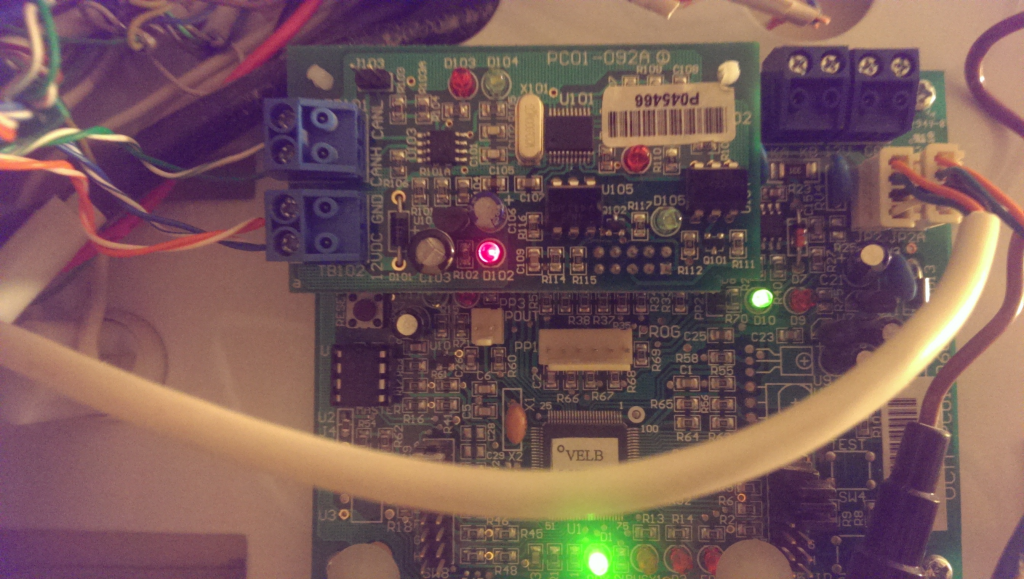
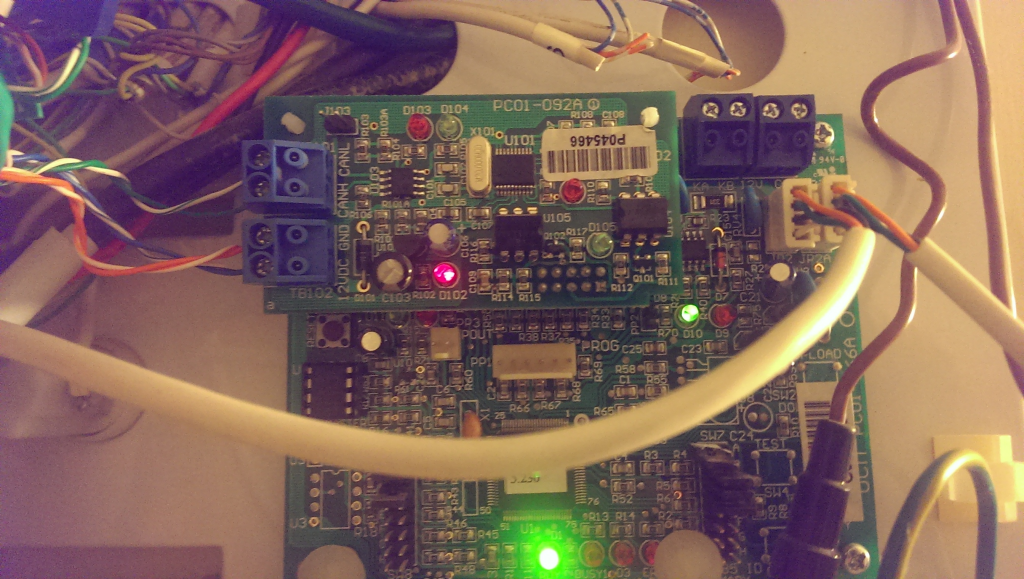
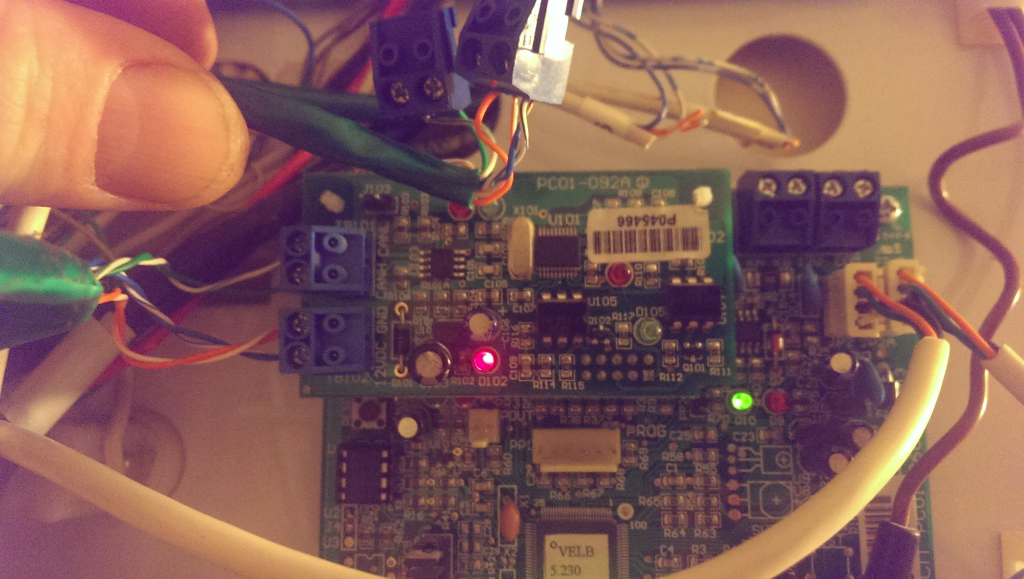
Photo is here
What you are looking at is the ucm velbus with the new cable I ran yesterday connected. The new cable is about 3ft long and connects direct to the use board housing my velbus modules.
You can also see the old cable with the connectors haning just besie it, this cable was abbrox 40ft run between comfort to a patch panel and back to the fuse board housing the velbus modules.
Again, at one point, I had the new short cable running to just one vmb4ry module last night, nothing else, and still no change.
As of 7am this morning, the velbus connection to comfort has started working again (comfort is performing velbbus commands based on pir responses), but the scs, keypads and ucm eth are still not contactable. I am expecting these to come back at about 8am.


