I am happy to announce that the new UCMA/Pi is ready
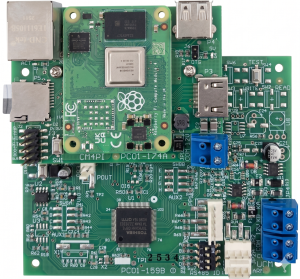
This includes a Raspberry Pi CM4 Compute module so there is no need for an external Raspberry device
The configuration is simple as it comes with a preconfigured Micro SD card
You can upload the CCLX file using the Comfort Add-on's Web UI,a nd the zones and Outputs are auto-dscovered. No need to edit yaml files excedpt for advanced applications
Notifcations to Mobile and Encrypted remote access are easily implemented
See the website at
https://www.cytech.biz/brochure/UCMA-Pi.html
Instructions in the Comfort Forums here:
http://www.comfortforums.com/thread-5857.html based onthe manual
The manual download link is
https://cytech.biz/download_files.php?item_id=1520
The Cytech Comfort MQTT add-on was based on thh work by koochyrat and Ingo, and it remain open-sourced, with the repository at
https://github.com/cytechtech/ucmpi4
Any recommendation for UK suppliers?
My usual go-to is Laser, but they don't seem to have them on their website, and I've emailed their Sales team, and got no reply.
Cheers,
Keith
Laser should have some, I will email them
(06-24-2026, 11:46 AM)slychiu Wrote: [ -> ]Laser should have some, I will email them
Thanks. I got a call. It appears some emails got lost (probably in spam folders).
Cheers,
Keith
Glad to see the new UCM Pi is finally available.
When my UCM/Pi3 failed, I quickly realised just how important redundancy is. I'd like to get the new UCM Pi, but it would mainly be running the stock software, as I already have a Home Assistant setup with redundancy in place. Everything currently runs through Home Assistant, including
Comfort to MQTT.
A few questions:
- Will I be able to configure the UCM Pi to use the MQTT broker on my primary Home Assistant server?
- Does the UCM Pi allow zone bypasses to be activated and deactivated directly, without having to create dedicated Comfort Responses? At the moment, that's something I have to do with Comfort to MQTT.
- If the UCM Pi is connected to the network, can I display or integrate its dashboard within my main Home Assistant instance?
Thanks.
[*]Will I be able to configure the UCM Pi to use the MQTT broker on my primary Home Assistant server?
[*]
Yes. I believe so although I have not tried
[*]The UCM Pi can be configured to communicate directly with the MQTT broker hosted on your main Home Assistant instance (such as the Mosquitto broker add-on).
How to configure it:- You do not need to run a secondary MQTT broker on the UCM Pi itself.
- In the MQTT client settings on the UCM Pi, change the host address to the IP address of your primary Home Assistant server.
- Enter the corresponding MQTT username, password, and port (the default is usually 1883)
- Ensure both devices are on the same local network and that no router or firewall settings are blocking traffic on that specific port.
[*]Does the UCM Pi allow zone bypasses to be activated and deactivated directly, without having to create dedicated Comfort Responses? At the moment, that's something I have to do with
Comfort to MQTT.
[*]Currently it does not have bypass zones button directly , but we wi are considering adding this in the future
[*]If the UCM Pi is connected to the network, can I display or integrate its dashboard within my main Home Assistant instance?
[*]If you want to view the UCM Pi's existing dashboard within your primary setup, you can embed it using an iframe.
- On your main Home Assistant dashboard, add a Webpage Card.
- Enter the local IP and port of the UCM Pi (e.g., http://:8123) into the URL field.
- Note: This acts as a window to the second device; you may need to log into the UCM Pi within that card, and the controls are not natively integrated into the primary system's backend. I have not tried this