
+- Comfort Automation/ Security System Forums (https://www.comfortforums.com)
+-- Forum: Third Party (interfacing to Comfort) (https://www.comfortforums.com/forum-5.html)
+--- Forum: Smart-House/Dupline (https://www.comfortforums.com/forum-109.html)
+--- Thread: UCM/Dupline Tutorial Part 2 (/thread-2913.html)
- ident - 06-17-2012
The Responses can be triggered by any Comfort Event, eg Zone On or Off, Alarms, Time programs, Home Control Menu, Sunrise/Sunset, Received IR code etc
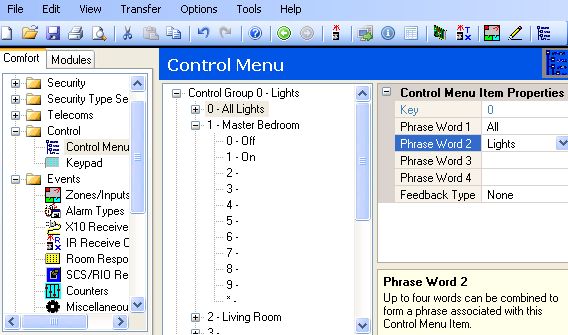
The example below shows a Home Control Menu in Comfort which can control Dupline
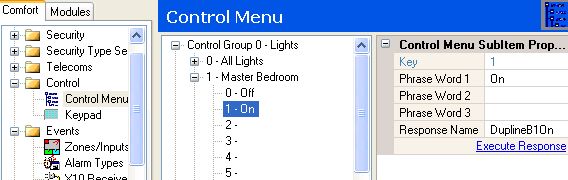
In the screenshow below, Master Bedroom On key activates the Response name DuplineB1On.
The free Comfort iPhone app will act on the programmed Home Control Menu
- ident - 06-17-2012
Time Programs can be used to schedule Dupline commands to any address

In the above example, Time Program 5 is programmed at 11 PM Monday to Sunday and Holidays to send All Lights Off command.
All Lights Off can be programmed to switch off several Dupline devices. This can be
done by calling other Responses which individually turn off Dupline devices as shown
below.

Please read the UCM/Dupline Manual which can be downloaded from https://www.cytech.biz/ucmdupline_manual.html