
+- Comfort Automation/ Security System Forums (https://www.comfortforums.com)
+-- Forum: Software Applications (https://www.comfortforums.com/forum-4.html)
+--- Forum: Comfigurator (https://www.comfortforums.com/forum-20.html)
+--- Thread: Make Comments Bigger (/thread-4205.html)
- juwi_uk - 05-09-2015
Hi
Simple enhancement request.
Could you please make the \"Comments\" field on the Configuration\\General Information node a bit larger or add scroll bars so that it is obvious there is more content.
I use this field to record the history of H/W changes I make to Comfort, ie new UCM added or battery changed. Problem is it only shows 6 lines at any time and always at the top so not obvious of my later changes. Yes I could reverse the order I guess so that latest is always at the top but a simple scroll bar would be nice pretty please too.
Ju
- admin - 05-09-2015
Hmm. This may be considered
- slychiu - 05-29-2015
This request has been implemented in 3.10.4
You can scroll the comments if there are too many lines.

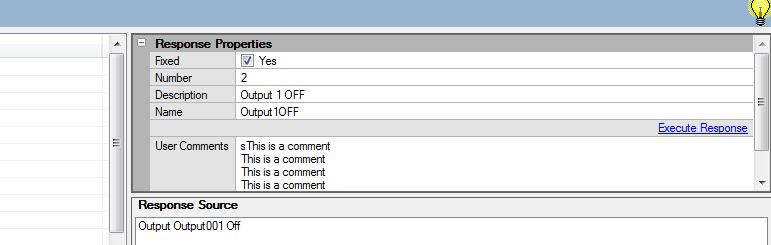
Also the Execute Response button is above the User Comments so this can be more easily seen
- juwi_uk - 05-29-2015
Thanks Chiu
My original query was for the comments in the \"General Information\" page but nice if you\'ve put in other places such as on responses too.
Small point on your screenshot; is that real or \"surgically enhanced\" in true \"smoke-and-mirrors\" fashion as scroll bar seems totally wrong with what I\'d expect and actually see in the product (see my screenshot).
Is it browser specific as my scrollbar is just in the comment text box?

- slychiu - 05-30-2015
You see the scrollbar when the comments lines extend downwards
- juwi_uk - 05-30-2015
Look at where your scrollbar is versus mine. Mine is in the comments field, yours is across all properties.
- Ingo - 05-30-2015
Mystery solved. If you move the bar highlighted in the attached image then the whole panel get\'s a scrollbar also.