


04-01-2016, 01:17 PM
if CS Manager cannot be used for upgrading ETH03 due to not being able to find it or any exception, you can use the TFTP command to upgrade the fiirmware instead
Run the dos command, ie Start button and type cmd in the window
In the Dos window, type
tftp (ip address) \"(path to hex file)\"
eg
tftp 192.168.1.2 put [color=\"#3333ff\"]\"C:\\download\\ETH03_general_2_20.hex\"
[/color]
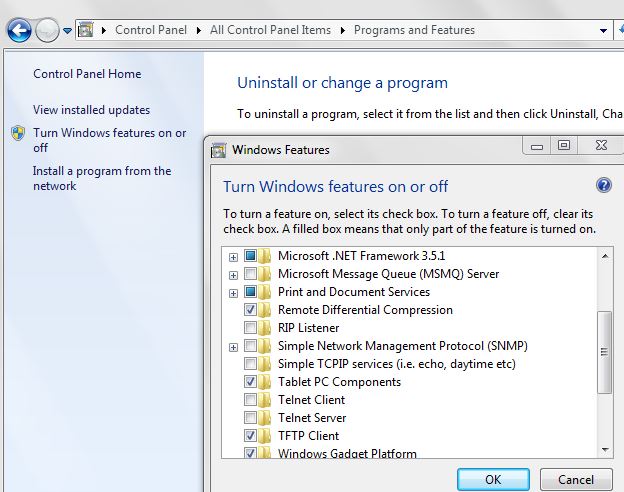
Note that the TFTP service is normally disabled in Windows, 7 onwards. To enable it, go to Control Panel in Windows, select Programs ad Features, find \"Turn on or off Windows Features\" on the left, and check the box for \"TFTP Client\"
see screenshot
[color=\"#3333ff\"][/color]
Run the dos command, ie Start button and type cmd in the window
In the Dos window, type
tftp (ip address) \"(path to hex file)\"
eg
tftp 192.168.1.2 put [color=\"#3333ff\"]\"C:\\download\\ETH03_general_2_20.hex\"
[/color]
Note that the TFTP service is normally disabled in Windows, 7 onwards. To enable it, go to Control Panel in Windows, select Programs ad Features, find \"Turn on or off Windows Features\" on the left, and check the box for \"TFTP Client\"
see screenshot
[color=\"#3333ff\"][/color]