We are investigating why the app does not work the same way on iOS4
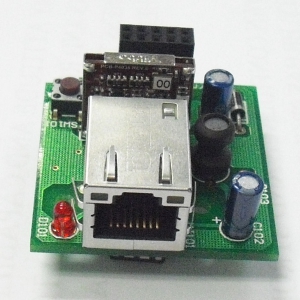
if you need to change to the new EM500 you just need to buy the ETH02 submodule and replace the ETH01 sub module
Hi Ident,
How do we identify eth02 and eth01 modules ?
Thanks,
Eamon
Eth02 is shown in the photos in the previous posts
Eth01 is an orange rectangular block I don\'t have a photo to show
Re my upload problem, I managed to update firmware.
\"Device Explorer\" has to be \"run as administrator\" in Windows Vista.
Thanks ident - Ill go see how much the new eth2 module is (you think its worth while updating regardless?)
Cheers
Stuart
Just to report that updating the firmware on ETH02 EM500 with supplied version 3.27.00 has not helped. The problem remains as described.
When you get the Connecting.. and data error message, can you use DS Manager and see if there is a connection symbol on the UCM/Ethernet as seen in the screenshot with the double arrow? This means that there is a connection active and it will prevent a new connection from being made
Can we have a quick straw poll on how you are accessing the Comfort system?
> Via WiFi (Same LAN as Comfort)
> Via Wifi (access via Internet)
> Via 3G (access via Internet)
I admit I do have access problems first time but a dummy destination switch seems to solve it for me - apart from certain locations where the Wifi is somewhat dodgy.
Dave.
[user=4334]Calistra[/user] wrote:
Quote:Can we have a quick straw poll on how you are accessing the Comfort system?
> Via WiFi (Same LAN as Comfort)
> Via Wifi (access via Internet)
> Via 3G (access via Internet)
I admit I do have access problems first time but a dummy destination switch seems to solve it for me - apart from certain locations where the Wifi is somewhat dodgy.
Dave.
Dave:
Starting in each case with a completely closed down app -
(1) Via WiFi (Same LAN as comfort) - connects okay
(2) Via WiFi (Access via internet) - connects okay
(3) Via 3G - data error.
When the app is started by (1) or (2) above, and then left running in the background, connecting via 3G seems to work okay when I leave the WiFi coverage/ switch off WiFi.
TWO OBSERVATIONS:
(A)
I want to emphasise what I said above. The main difference between our iOS 4 and iOS 5 phones is that the app does not, with iOS 5, remember the last system when it is started up from the \"completely closed\" state.
i.e.:
When the iOS4 phones completely close down the app, and then restart the app, the last connection is remembered and immediately the phone restores the \"connected\" status. No selection of the system involved is required.
When the iOS5 phones completely close down the app, and then restart the app, the connection is not remembered. When the system is immediately reselected in 3G, the \"data error\" happens.
(B)
On a couple of occassions starting up a completely closed app, with 3G coverage (no WiFi), and NOT selecting the system but leaving it on the \"home\" page, I have gotten a connection error warning dialogue. How could I get a connection error if I havent selected a system with which to connect? Other times the app dissapears into the background after a short time.