Thread Rating:
  • 0 Vote(s) - 0 Average
  • 1
  • 2
  • 3
  • 4
  • 5
New Comfort2MQTT for Home Assistant
#21
That is correct, it enriches the log entries as I cannot programmatically determine which zones, outputs, flags etc. are assigned to which device types like door, windows or lights or any other integration to Comfort.

#22
That is understood. Great work by koochyrat and Ingo! I will start a new topic on the steps to install the add on with home assistant on a Raspberry Pi, so that novices like me will be able to do it easily.

#23
quick question - why are there 2 MQTT devices; Comfort 2 Ultra and Comfort2MQTT bridge? I am trying to understand the function

#24
The Bridge is the software component linking Comfort to MQTT - the \'Bridge\'. Comfort is the actual device itself.

#25
For my new introduction and step by step guide to implementing Comfort2MQTT o a raspberry Pi, see 

http://www.comfortforums.com/forum27/5577.html  - Introduction
http://www.comfortforums.com/forum27/5572.html - Guide Part 1
http://www.comfortforums.com/forum27/5577.html - Guide Part 2
http://www.comfortforums.com/forum27/5577.html - Guide Part 3

#26
Hi Ingo, I am trying to get the battery status update working. I am using the Arm Comfort PCB but  when I press Battery Updtae Button,  the log shows Unsupported Battery Update received;

2024-12-13 13:06:19 DEBUG    D?0101E8
2024-12-13 13:06:20 DEBUG    D?0102D1
2024-12-13 13:06:47 WARNING  Unsupported Battery Update query received.
2024-12-13 13:07:00 WARNING  Unsupported Battery Update query received.
2024-12-13 13:08:00 WARNING  Unsupported Battery Update query received.
2024-12-13 13:09:00 WARNING  Unsupported Battery Update query received.
2024-12-13 13:10:00 WARNING  Unsupported Battery Update query received.
2024-12-13 13:10:49 DEBUG    D?0101E8
2024-12-13 13:10:51 DEBUG    D?0102D1
2024-12-13 13:11:00 WARNING  Unsupported Battery Update query received.
it happens every minute as well using the automation

Is there any other setting missing from the instructions?

#27
Hi Chiu,

Yes, that feature I coded without having the HW to test with. I gave it my best shot. You are welcome to email me the logs so I can investigate with you to come up with a solution.

Ingo

#28
The issue was found in the Home Assistant Battery Update Automation for ARM processors. I\'ve updated the release to 1.2.5 that correctly handles HA \'quoted\' variable parameters.

#29
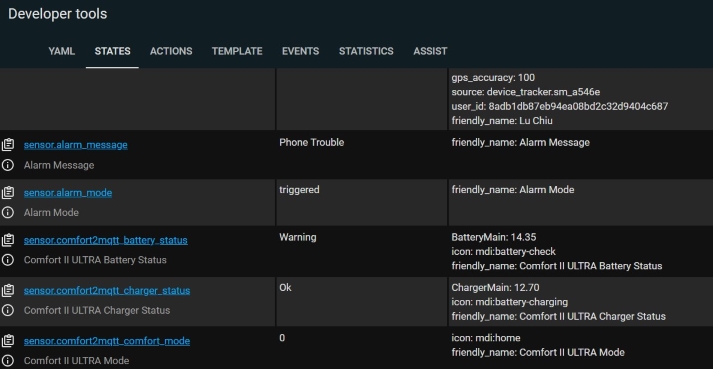
Thanks Ingo. The error message is gone, the update seems to work. The voltages can be seen in Developer Tools > States. 12.70 and 14.35. The labels seems to be swapped. Charger voltage should be 14.35 and Battery should be 12.70


But when I add the card to the dashboard,  there seems to be no option to display the voltages (attributes) , it is OK and Warning which are the States which are fixed


Attached Files Thumbnail(s)
   

#30
When I click into the Charger Status,

the attribute ie voltage can be seen.
Is there a threshold setting for OK and Warning states?


Attached Files Thumbnail(s)


Forum Jump:


Users browsing this thread:
4 Guest(s)

Powered By MyBB, © 2002-2026 Melroy van den Berg.