


Comfigurator 3 is able to Scan for all modules connected to Comfort and show each modules type and firmware version even though the number of modules of each type has not been set yet.
However the ID shunts on each module must be set to the correct value so that it does not conflict with any other module of the same type
In the Modules Tab, right-click on any of the folders (UCM, keypads, Door Station, SCS/RIO, Slave) and select Scan for All Modules.
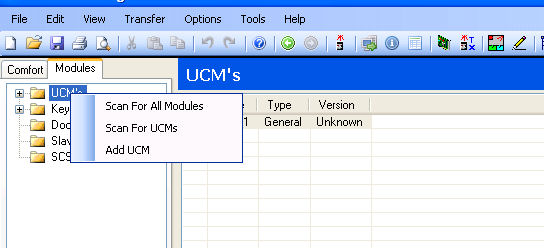
The typical result of the scanning is shown in the screenshot below

In the example above, 7 UCMs have been discovered and the types shown
Keypads, Door Stations, Slaves and SCS/RIO have also been discovered as seen by the \'+\' sign next to each of the individual folders
The modules found or added are automatically added to the Numbers of Modules in Modules and settings

The following minimum versions are applicable to support the scanning function for the various modules;
However the ID shunts on each module must be set to the correct value so that it does not conflict with any other module of the same type
In the Modules Tab, right-click on any of the folders (UCM, keypads, Door Station, SCS/RIO, Slave) and select Scan for All Modules.
The typical result of the scanning is shown in the screenshot below
In the example above, 7 UCMs have been discovered and the types shown
Keypads, Door Stations, Slaves and SCS/RIO have also been discovered as seen by the \'+\' sign next to each of the individual folders
The modules found or added are automatically added to the Numbers of Modules in Modules and settings
The following minimum versions are applicable to support the scanning function for the various modules;
- Comfigurator 3.2.4 or latest version, free download
- Comfort firmware 5.195
- UCM/232, UCM/USB, UCM/Ethernet firmware 5.171
- UCM (all other types) firmware 5.168
- Slave firmware 5.156
- KP04 firmware 1.010

