That is correct, it enriches the log entries as I cannot programmatically determine which zones, outputs, flags etc. are assigned to which device types like door, windows or lights or any other integration to Comfort.
That is understood. Great work by koochyrat and Ingo! I will start a new topic on the steps to install the add on with home assistant on a Raspberry Pi, so that novices like me will be able to do it easily.
quick question - why are there 2 MQTT devices; Comfort 2 Ultra and Comfort2MQTT bridge? I am trying to understand the function
The Bridge is the software component linking Comfort to MQTT - the \'Bridge\'. Comfort is the actual device itself.
Hi Ingo, I am trying to get the battery status update working. I am using the Arm Comfort PCB but when I press Battery Updtae Button, the log shows Unsupported Battery Update received;
2024-12-13 13:06:19 DEBUG D?0101E8
2024-12-13 13:06:20 DEBUG D?0102D1
2024-12-13 13:06:47 WARNING Unsupported Battery Update query received.
2024-12-13 13:07:00 WARNING Unsupported Battery Update query received.
2024-12-13 13:08:00 WARNING Unsupported Battery Update query received.
2024-12-13 13:09:00 WARNING Unsupported Battery Update query received.
2024-12-13 13:10:00 WARNING Unsupported Battery Update query received.
2024-12-13 13:10:49 DEBUG D?0101E8
2024-12-13 13:10:51 DEBUG D?0102D1
2024-12-13 13:11:00 WARNING Unsupported Battery Update query received.
it happens every minute as well using the automation
Is there any other setting missing from the instructions?
Hi Chiu,
Yes, that feature I coded without having the HW to test with. I gave it my best shot. You are welcome to email me the logs so I can investigate with you to come up with a solution.
Ingo
The issue was found in the Home Assistant Battery Update Automation for ARM processors. I\'ve updated the release to 1.2.5 that correctly handles HA \'quoted\' variable parameters.
Thanks Ingo. The error message is gone, the update seems to work. The voltages can be seen in Developer Tools > States. 12.70 and 14.35. The labels seems to be swapped. Charger voltage should be 14.35 and Battery should be 12.70
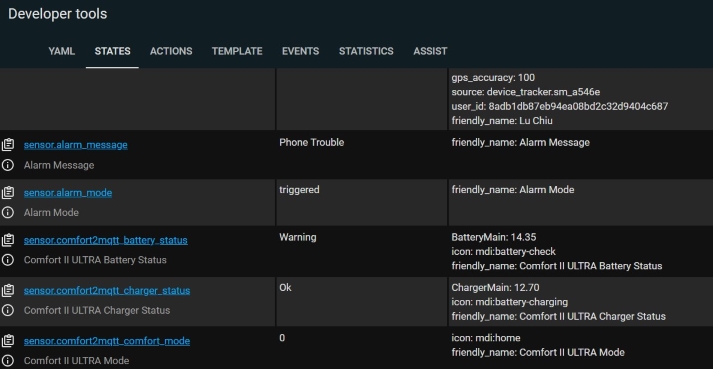
But when I add the card to the dashboard, there seems to be no option to display the voltages (attributes) , it is OK and Warning which are the States which are fixed
When I click into the Charger Status,
the attribute ie voltage can be seen.
Is there a threshold setting for OK and Warning states?