Thread Rating:
  • 0 Vote(s) - 0 Average
  • 1
  • 2
  • 3
  • 4
  • 5
UCMA/Pi for Home Assistant
#1
Photo 
I am happy to announce that the new UCMA/Pi is ready
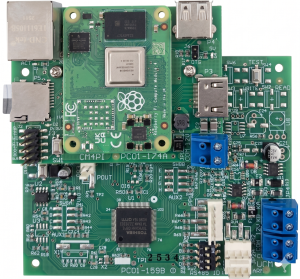


This includes a Raspberry Pi CM4 Compute module so there is no need for an external Raspberry device
The configuration is simple as it comes with a preconfigured Micro SD card 
You can upload the CCLX file using the Comfort Add-on's Web UI,a nd the zones and Outputs are auto-dscovered. No need to edit yaml files excedpt for advanced applications

Notifcations to Mobile  and Encrypted remote access are easily implemented

See the website at https://www.cytech.biz/brochure/UCMA-Pi.html
Instructions in the Comfort Forums here: http://www.comfortforums.com/thread-5857.html based onthe manual

The manual download link is https://cytech.biz/download_files.php?item_id=1520 

The Cytech Comfort MQTT add-on was based on thh work by koochyrat and Ingo, and it remain open-sourced, with the repository  at https://github.com/cytechtech/ucmpi4
Reply

#2
Any recommendation for UK suppliers?

My usual go-to is Laser, but they don't seem to have them on their website, and I've emailed their Sales team, and got no reply.

Cheers,

Keith
Reply

#3
Laser should have some, I will email them
Reply

#4
(06-24-2026, 11:46 AM)slychiu Wrote: Laser should have some, I will email them

Thanks. I got a call. It appears some emails got lost (probably in spam folders).

Cheers,

Keith
Reply

#5
Glad to see the new UCM Pi is finally available.

When my UCM/Pi3 failed, I quickly realised just how important redundancy is. I'd like to get the new UCM Pi, but it would mainly be running the stock software, as I already have a Home Assistant setup with redundancy in place. Everything currently runs through Home Assistant, including Comfort to MQTT.

A few questions:
  • Will I be able to configure the UCM Pi to use the MQTT broker on my primary Home Assistant server?
  • Does the UCM Pi allow zone bypasses to be activated and deactivated directly, without having to create dedicated Comfort Responses? At the moment, that's something I have to do with Comfort to MQTT.
  • If the UCM Pi is connected to the network, can I display or integrate its dashboard within my main Home Assistant instance?

Thanks.
Reply

#6
[*]Will I be able to configure the UCM Pi to use the MQTT broker on my primary Home Assistant server?


[*]Yes. I believe so although I have not tried 
[*]The UCM Pi can be configured to communicate directly with the MQTT broker hosted on your main Home Assistant instance (such as the Mosquitto broker add-on).
How to configure it:
  • You do not need to run a secondary MQTT broker on the UCM Pi itself.
  • In the MQTT client settings on the UCM Pi, change the host address to the IP address of your primary Home Assistant server.
  • Enter the corresponding MQTT username, password, and port (the default is usually 1883)
  • Ensure both devices are on the same local network and that no router or firewall settings are blocking traffic on that specific port.


[*]Does the UCM Pi allow zone bypasses to be activated and deactivated directly, without having to create dedicated Comfort Responses? At the moment, that's something I have to do with Comfort to MQTT.

[*]Currently it does not have bypass zones button directly , but we wi are considering adding this in the future


[*]If the UCM Pi is connected to the network, can I display or integrate its dashboard within my main Home Assistant instance?
[*]If you  want to view the UCM Pi's existing dashboard within your primary setup, you can embed it using an iframe.
  • On your main Home Assistant dashboard, add a Webpage Card.
  • Enter the local IP and port of the UCM Pi (e.g., http://:8123) into the URL field.
  • Note: This  acts as a window to the second device; you may need to log into the UCM Pi within that card, and the controls are not natively integrated into the primary system's backend. I have not tried this
Reply

#7
(05-17-2026, 06:57 AM)slychiu Wrote: I am happy to announce that the new UCMA/Pi is ready


This includes a Raspberry Pi CM4 Compute module so there is no need for an external Raspberry device
The configuration is simple as it comes with a preconfigured Micro SD card 
You can upload the CCLX file using the Comfort Add-on's Web UI,a nd the zones and Outputs are auto-dscovered. No need to edit yaml files excedpt for advanced applications

Notifcations to Mobile  and Encrypted remote access are easily implemented

See the website at https://www.cytech.biz/brochure/UCMA-Pi.html
Instructions in the Comfort Forums here: http://www.comfortforums.com/thread-5857.html based onthe manual

The manual download link is https://cytech.biz/download_files.php?item_id=1520 

The Cytech Comfort MQTT add-on was based on thh work by koochyrat and Ingo, and it remain open-sourced, with the repository  at https://github.com/cytechtech/ucmpi4

This is FANTASTIC! - I just got started with a Home Assistant deployment, and I'm mightily impressed. I'd already mused to myself, "wouldn't it be great if I could integrate Comfort with this..." :-) 

Just so I'm clear, this includes a FULL HAOS deployment complete with the supervisor layer yes? - exactly the same experience as I'd get with a Home Assistant Green? - not just the Home Assistant core?

But it then begs the obvious question... - since the CM4 already includes comfort specific integrations, - would I lose them if I were to restore my current HA config? - either at the onboarding stage (by restoring an existing backup instead of going through the startup & onboarding again) or by restoring a backup later on after the CM4 HA instance is up & running as per the standard setup process... Obviously I've already done quite a few hours of config & testing on my existing HA instance, & I'd really rather not have to go through all that again if I can avoid it... (assuming I can even remember all the steps I already performed!)

So, what would be the advice/guidance for an existing HA instance to migrate to this new UCM?

Many thanks

Paul G.
Reply

#8
Actually... I have further questions.. - the device page specifies: "USB: 1 × USB 2.0 (maintenance use only)" - How does that square with the need to connect a Zigbee/Thread radio to the HA instance? - I currently have the (USB only) Sonoff Dongle Plus MG24... I am aware of the Sonoff Dongle MAX which can connect via ethernet/wifi, so I guess that could solve that one... But the next one isn't so simple: "Storage: Pre-programmed micro SD card (included)" I'm really wary of SD for the write-heavy load of HA's recorder database, and the subsequent wear on the SD card... - is there any way at all to utilise the PCIe hardware which does exist on the CM4 to connect (say) an NVMe SSD via the appropriate HAT??

Thoughts??

Paul G.

Or.. how about, a free-tier cloud option like (say) Oracle Cloud's perpetually-free ARM instance running MariaDB, joined to my tailnet, to provide a shared, professionally hosted, always-on database as the target for the recorder database instead of any local storage? - anyone tried that?

Thoughts??

Paul G.
Reply


Forum Jump:


Users browsing this thread:
1 Guest(s)

Powered By MyBB, © 2002-2026 Melroy van den Berg.