Welcome, Guest
You have to register before you can post on our site.

Username
  

Password


Search Forums

(Advanced Search)

Latest Threads
HELP ! CBUS/KNX translato...
Last Post: slychiu
2 hours ago
UCMA/Pi for Home Assistan...
Last Post: slychiu
2 hours ago
CBUS to KNX translator - ...
Last Post: Home
5 hours ago
Cbus to KNX translator - ...
Last Post: slychiu
Today, 01:58 AM
System not announcing are...
Last Post: slychiu
Today, 01:43 AM
Trouble connecting
Last Post: Home
09-21-2026, 03:42 PM
Comfort Analog Input Grap...
Last Post: slychiu
09-12-2026, 08:31 AM
Comfort Server Manager 2
Last Post: slychiu
09-08-2026, 04:48 AM
Comfort App Converter Dow...
Last Post: slychiu
09-08-2026, 02:00 AM
Comfort Android App 2.1 t...
Last Post: slychiu
09-08-2026, 01:56 AM

Forum Statistics
» Members: 53,661,   » Latest member: PaulGordon,   » Forum threads: 5,216,   » Forum posts: 28,681,  
Full Statistics

  Comfort UPNP <-> SmartThings <-> Amazon Echo
Posted by: mattbrain - 10-13-2016, 06:32 PM - Forum: alphaWerk UHAI RPi (Community Edition) - Replies (234)

Hi All
I have been busily beavering away on a pet project and have developed a UPNP interface for Comfort. The Interface is written in node.js and can run as a service on a RPi or similar. 
This allows Samsung SmartThings (and presumably other similar systems) to discover and instantiate Comfort devices (primarily Zones, Outputs and if desired basic alarm control).
Using SmartThings as a central hub, I am then able to connect Amazon Echo, IFTTT and other services to it as well as control other devices under SmartThings control (Phillips Hue etc)
Whilst it works well for me, it is still very much a work in progress and I would like to know:
1. Is there enough community interest in this to justify cleaning up my code and making it more generic (by reading configuration from Comfigurator)
2. What other features would people like / find useful aside from Zone, Outputs and Basic Alarm
3. Are there any willing volunteers who would like to give it a go?
Thanks,
Matt

Print this item

  getting scs led to blink
Posted by: wexfordman - 10-13-2016, 03:03 AM - Forum: Scene Control Switches (OBSOLETE) - Replies (2)

Hi,
I want an scs output to display three different states for our immerion heater
1) Flashing:- Indicating immersion is on and heating water to a required temp.2) Hard on:- Indicating water has reached a specific temp.3) Off:- Indicating immesion is off, and water is not at temp.
Is a flahsing state possible for an scs led, the manual says no, but is there a logic I could aply to pulse the output ?

Print this item

  Counter value change not triggering response
Posted by: wexfordman - 10-11-2016, 06:36 PM - Forum: Responses and Actions - Replies (3)

Hi,
I have a counter which will increment/decrement based on the need to have the oil burner on (ie, if the heating calls for hot water then incremnt counter, which then triggers a response to trun on the burner)
My logic is, there are a number of different reasons for having the burner on, so as each resource calls for the burner, i increment the counter by one, and decrement it by 1 when a resource no longer needs it.
So my counter response triggers the activation of he heating based on the value of the counter!
But, for some reason the counter response is not triggering ?
Counter 88 triggers a response called \"HEAT BURNER TOGGLE\"

If counter \"burner_required\" = 0 then
      Do \"Heat burner off\"
   else if counter \"burner_required\">0
      do \"heat burner on\"
  end if
end if


The change in counter value is working when I request it, but it is not triggering the response!
I am under a bi of pressure to get this up and running, as I need to have it working in order to qualify for a home heating grant which expires end of the month, so would really appreciate some help.
I am basivaly trying to get comfort up and running with thermostatic control based on scs values etc.

Print this item

  Activating Response by Dial in
Posted by: pgc_uk - 10-11-2016, 11:18 AM - Forum: Questions on Using Comfort - Replies (3)

Hi
I need to trigger a response to reboot my broadband router at my holiday home but it is not on the home control menu.  What are the steps to either reprogram the Home Control menu or to trigger the code sequence directly?
In comfigurator on my laptop the response no is 337, and the code sequence is 195, 65, 5, 7, 194, 19, 0, 18, 1, 255
I\'ve never used dial up programming so would not know where to start.
Thanks
Pete

Print this item

  Setting comfort flag from cbus
Posted by: Julian.Driver - 10-09-2016, 01:33 PM - Forum: CBus - Replies (2)

I have an integrated comfort / Cbus setup. The cbus has a lux meter installed. Is it possible to get the lux meter to set a comfort flag when ambient light drops below a given value, and then unset it when the light increases above?

Print this item

  Google home integration?
Posted by: wexfordman - 10-05-2016, 09:09 PM - Forum: Software Tools and Misc Interfaces - Replies (9)

OK, what is the likelihood of comfort building integration to the new google home controller? 
We have amazon echo and now google home, so we do need tpmstsrt seeing some level of functionality with these sort of devices? 

Print this item

  Comfort iOS App Screenshots
Posted by: slychiu - 10-03-2016, 08:13 AM - Forum: iOS Apps - No Replies

These are some screenshots from the Comfort iOS app

Login Screen


Alarm Status Screens


On the top, you can see the current mode of the system which is \"Security Off\". The system can be armed to Away/Night/Vacation/Day mode by touching the button.


Arm the security system to Away, Night, Day or disarm to Security Off


Press the Control icon on the bottom to go to the Control Page. The state of Appliances can also be seen


Print this item

  Partitions in Comfort - Case Study
Posted by: slychiu - 10-02-2016, 07:12 AM - Forum: FAQs - Technical - Replies (12)

This is a case study for implementation of Partitions in the Cytech Office itself which was the first installation where this was used
See http://www.comfortforums.com/forum16/4491.html

Our office consists of 3 areas

General Office with R&D,  Admin-Partition 0
CP9001 and LEM01 with 16 zones
Keypads -  KT03, KP06A, KP04A, KP03
Alarm Zones - Wooden Entry Door, Glass Door, PIRs, smoke detector
Control - Lights,  KNX, Cbus, Zwave, Airconditioners
Access control - standalone keypad at front entrace
Door station - DS01

Assembly, Test and Repair Area with KP04A  - Partition 3
SEP01 and LEM01 with 16 zones
Keypad - KT03
Alarm Zones - Entry Door,  PIRs connected to the SEP01, although partition zones can be connected to CM9001 or or any slave for convenience of wiring.
Control - Lights,  Airconditioners
This has a separate entrance from the Main Office and is armed and disarmed independently from the Main office

Store for Components and Finished Goods  - Partition 1
Keypad - KP04A
Alarm Zones - Entry Door,  PIRs, smoke detector
The entrance is through the Assembly/Test area.
The alarm sensors are connected to the SEP01 in the Store.
Control - Lights
This is armed independently of the other 2 areas but access is through the Assembly/Test area so that partition must be disarmed before entering and disarming this one.


Partition 2 is not used. If no zones or no keypads are assigned to a partition then the partition is disabled.

The keypads in each Partition are assigned to that partition. Keypads can only be assigned to one partition.

The Door station at the main entrance will chime on the Keypads in that partition only. Each Door Station is assigned to 1 partition. Each Partition could also have their own door station.

16 users are each assigned to a combination of Partitions for disarming and arming. For example, User 1 is assigned to all partitions, user 2 3,4 for partition 0, user 10 for Partition 1 and 3, user 10 for partition 3.

In order to disarm a partition, the user has to sign in on a keypad in the partition and has to be enabled for the partition.

The Siren and Strobe are connected to the main office. A separate Siren and Strobe can also be connected to the SEP01. The Sirens and Strobes operate together whether connected to Comfort or SEP

When each partition is armed to Away Mode, the lights and appliances in the partition are switched off automatically using the Away Mode Response for each Partition


The Entry Alert for each partition is programmed to turn on a light for the partition

eg Entry Alert Response in Security Types
If Partition = 0 Then
    Do LobbyLight1OFF After 100 Seconds Using EntryLightTimer
    Do LobbyLight2ON
    Do LobbyLight1ON
Endif
If Partition = 1 Then
   Do Store Light On
End If
The Entry Alert \"Alarm\" is caused by opening an Entry Door when the security is armed. As the Entry Alarm can be caused by entry door in any partition, the action If Partition = xx allows the individual partition to be selected for processing


Security Off  can also turn on lights and appliances in the partition using the Security Off Response for the Partition.


Each Partition has their own independent Alarm State, Entry Path, keypads, users, so it appears to be 3 separate alrm systems. However the partitions share a single telephone line and Siren/strobe (although each slave can have siren and strobe connected).

When an alarm occurs in a partition, only the keypads in that partition  will sound the alarm, but the common Siren and strobe will turn on.

Time Programs automatically auto-arms each partition at different times in case the last person forgets to arm the partition. This is done in Time Program Response using the Set Partition Action. Set Partition sets the partition number for the following actions.

eg Time Program at 10 PM
Set Partition 0
  Autoarm Away mode
End If

In the example above, Autoarm Away mode acts on Partition 0

eg Time Program at 11 PM
Set Partition 1
  Autoarm Away mode
End If

Set Partition 3
  Autoarm Away mode
End If

In the example above, set partition 1 tells Autoarm Away mode to act on Partition 1 and then set Partition 3 tells auato arm to act on Partition 3.
If the Set  Partition action is missing, it will default to Partition 0, so Autoarm and other actions will assume partition 0


The Partitions feature is very useful for a business with different entrances or areas like this as it allows separate areas to be armed and disarmed independently. Prior to this beng available, the store KT03 had to have a complicated program where certain zones are set to 24 hours and are bypassed and unbypassed together. Programming or configuration of Partitions is simple.

Print this item

  Global Home Automation System Market 2016: ABB Ltd, Crestron Electronics Inc, Cytech Technology Pte.
Posted by: slychiu - 10-01-2016, 05:25 AM - Forum: HA in the News - Replies (1)

The Global Home Automation System Industry 2016 Market Research Report is a professional and in-depth study on the current state of the Home Automation System industry. Firstly, Home Automation System Market report provides a basic overview of the Home Automation System industry including definitions, classifications, applications and Home Automation System industry chain structure. Global Home Automation System Market analysis is provided for the international market including development history, Home Automation System industry competitive landscape analysis, and major regions development status on Home Automation System Market scenario.
Major Manufacturers Analysis of Home Automation System :-
1. ABB Ltd.
2. Crestron Electronics Inc.
3. Cytech Technology Pte. Ltd.
4. Honeywell International
5. Ingersoll-Rand Plc.
6. Johnson Controls Inc.
7. Legrand S.A.
8. Schneider Electric SA
9. Siemens AG


https://www.linkedin.com/pulse/global-ho...ron-shirke

Print this item

  Surface Mount Backbox for KP06A
Posted by: slychiu - 09-27-2016, 04:39 PM - Forum: KP06/KP06A/KP04A Keypads - Replies (1)

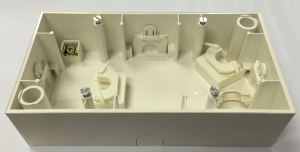
Berker has a 2gang surface mount backbox in their S1 range which is suitable for the KP06, for installations where flush mount is not possible.


Size 168 x 84 x 42 mm
Insertion Depth 37 mm

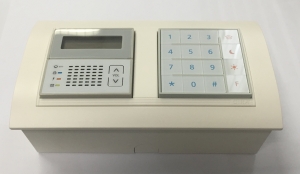
KP06 mounted in  the 2 gang surface mount backbox is shown below, with the FR2-EV-WH frame which covers the box completely
It is not as thin looking as the wallmounted KP06 but it may e needed in some installations


This is the link to the Berker backbox
http://www.berker.com/berker-online-cata...4-5824.htm

Print this item


Online Users
There are currently 1098 online users. » 0 Member(s) | 1092 Guest(s)
Applebot, Baidu, Bing, Facebook, Google, Yandex

Powered By MyBB, © 2002-2026 Melroy van den Berg.